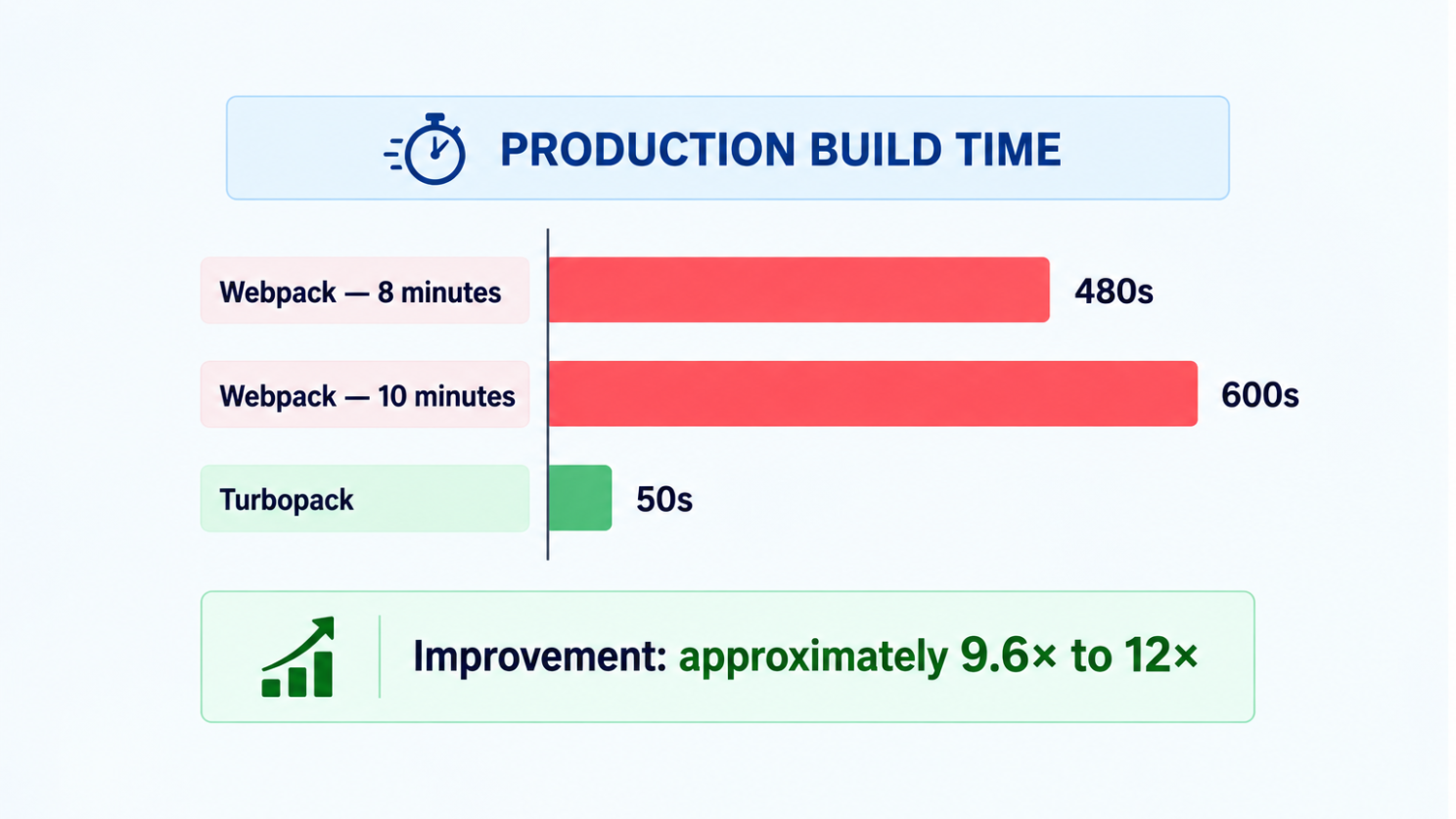
I Reduced My Next.js Production Build Time by 12× — From 10 Minutes to 50 Seconds
- Home
- I Reduced My Next.js Production Build Time by 12× — From 10 Minutes to 50 Seconds

The project was already running Next.js 16, but its scripts explicitly selected Webpack:
"dev": "next dev --webpack" "build": "next build --webpack"
Next.js 16 uses Turbopack by default, but the --webpack flag opts out of it. The project also had a custom webpack() function inside next.config.mjs that configured browser fallbacks for Node.js modules such as fs, net, tls and dns.
As long as these settings remained, the application continued using the legacy Webpack compilation pipeline.
The updated scripts are much simpler:
"dev": "next dev" "build": "next build"
I also removed the obsolete Webpack configuration after confirming that the application did not need those fallbacks.
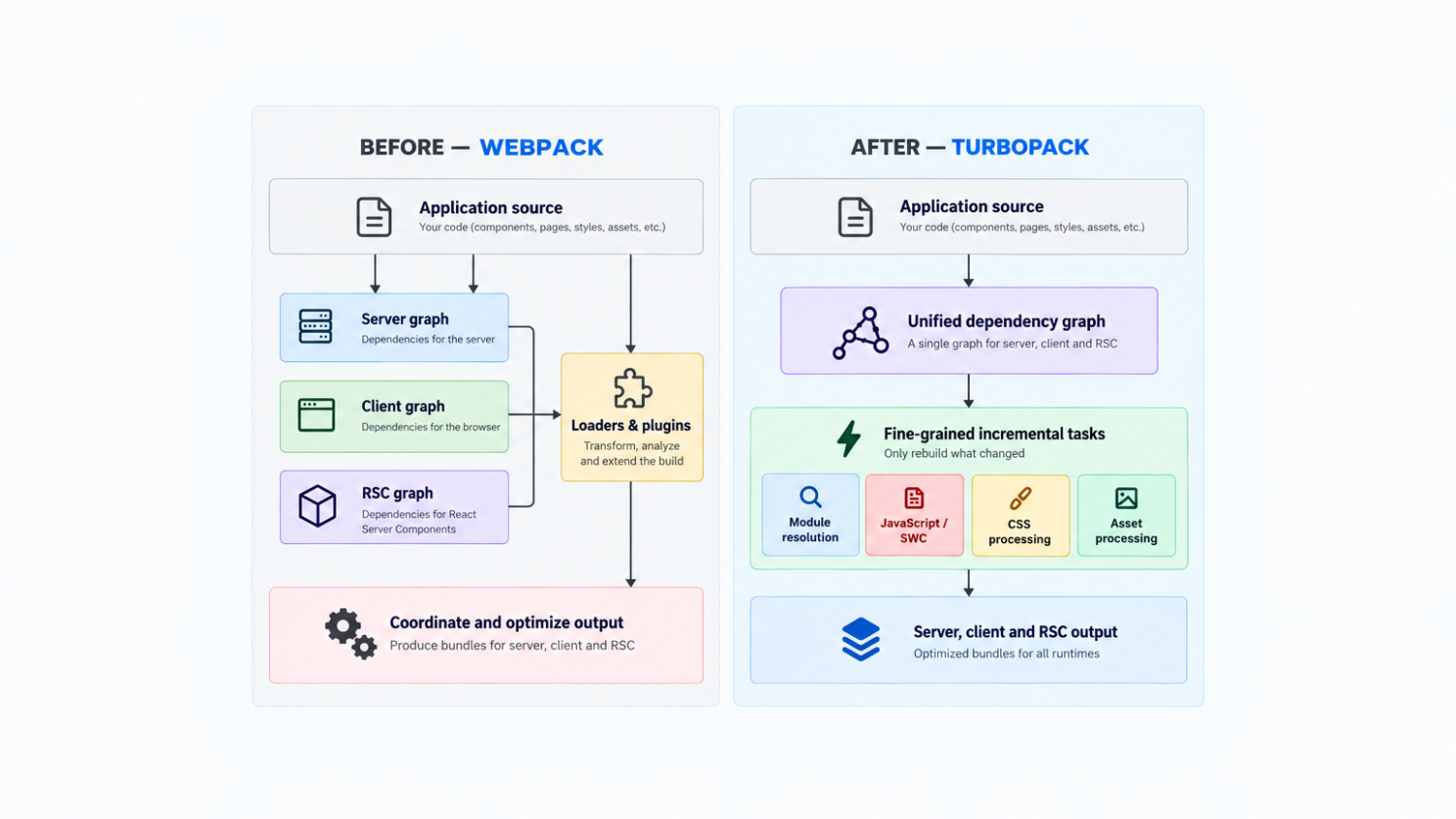
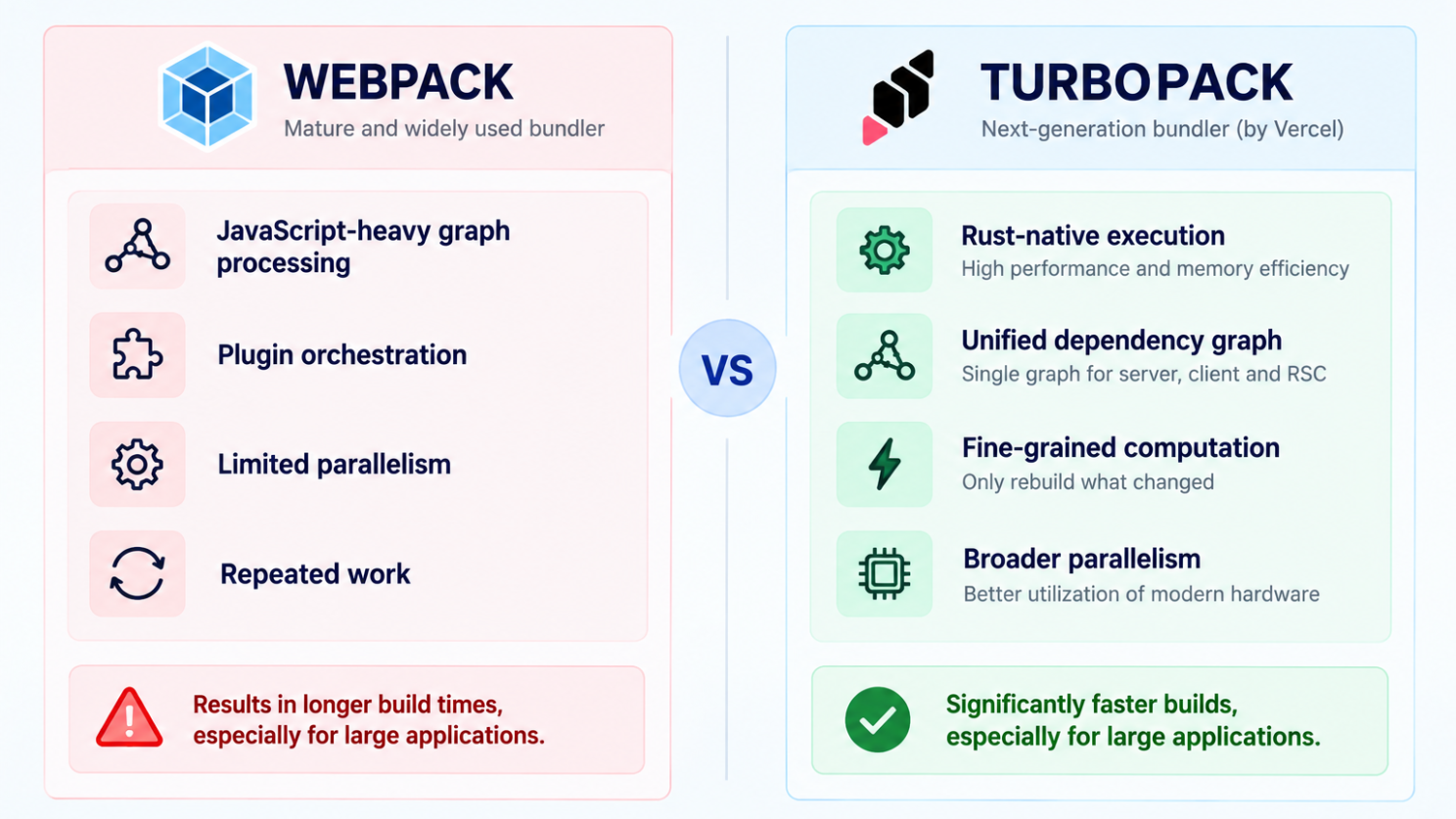
Webpack runs primarily inside Node.js and represents modules, dependencies, chunks, loaders and plugin state as large JavaScript object graphs.
For a large application, that creates overhead from object allocation, V8 garbage collection, dependency graph traversal, communication between worker processes, plugin execution and serialization.
Turbopack's core is written in Rust and was designed for concurrency from the beginning. Rust allows the compiler to use shared data structures across threads more efficiently, so module resolution, transformation, dependency analysis, CSS processing and output generation can use more of the available CPU.
Webpack can parallelize transformations through tools such as SWC, but Turbopack can parallelize a much larger portion of the complete compilation process.
A modern Next.js application does not produce one simple JavaScript bundle. The compiler must generate code for browser components, React Server Components, Node.js server code, route handlers, static generation, dynamic imports, CSS and other assets.
Traditional bundling can involve separate compiler graphs that must eventually be coordinated. Turbopack models the environments inside a unified dependency graph and understands transitions between server components, client boundaries and browser dependencies.
This allows it to reuse dependency-resolution and transformation results instead of repeatedly processing overlapping parts of the application.
A compiler performs many smaller operations for each module:
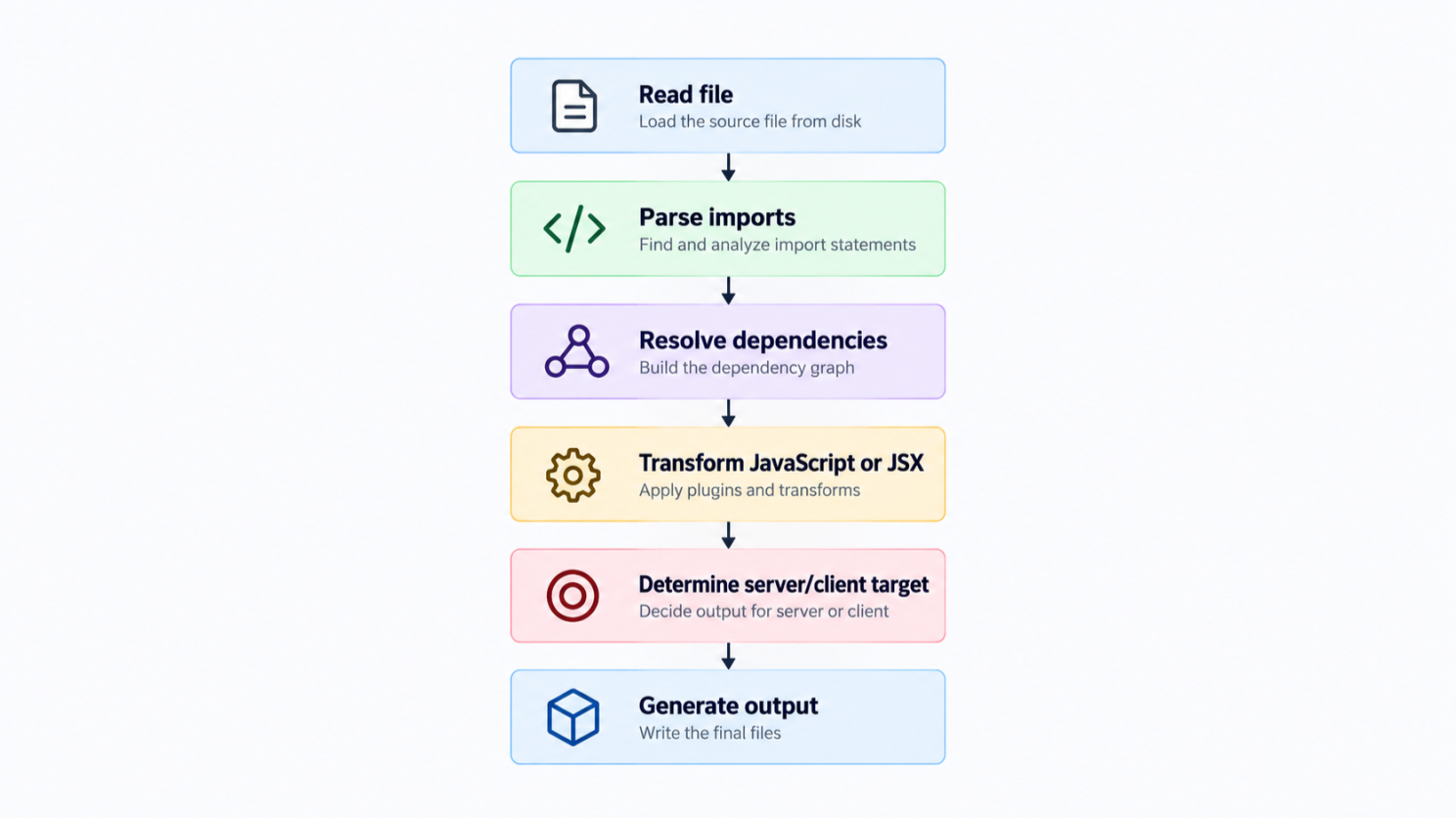
Turbopack treats these operations as an incremental computation graph. When an input has not changed, the previous result can be reused instead of recalculating every downstream step.
The key idea is simple: Turbopack becomes faster by building less.
Webpack was not originally designed around highly parallel, shared-memory compilation. Moving large JavaScript objects between worker processes can be expensive enough to reduce the benefit of parallel execution.
Turbopack was designed to distribute more categories of work across available cores, including module resolution, dependency analysis, JavaScript transformation, CSS processing and asset handling.
This application has more than 800 installed packages, including authentication, PostgreSQL, Stripe, Firebase, Tiptap, EditorJS, Bootstrap, Framer Motion and email integrations.
Resolving that dependency tree requires an enormous number of filesystem operations: locating packages, reading package.json files, interpreting exports, choosing ESM or CommonJS entry points, resolving nested dependencies and analyzing side effects.
Turbopack's native filesystem and module-resolution architecture can reuse these results more effectively. This can be especially noticeable on Windows, where repeatedly traversing a large node_modules directory is relatively expensive.
Webpack is a general-purpose bundler. Next.js adds framework-specific behavior through loaders, plugins, manifests and multiple compiler passes.
Turbopack is developed as part of Next.js and directly understands App Router pages, layouts, React Server Components, use-client boundaries, route handlers, client/server manifests, dynamic imports and Next.js runtime targets.
Instead of teaching a generic bundler how Next.js works through integration layers, Turbopack models these concepts directly.
Turbopack's stricter CSS processing exposed several legacy issues that Webpack had tolerated.
Google Font @import statements appeared in the middle of a large stylesheet. CSS requires imports to appear before ordinary style rules, so I moved them to the beginning of the file.
The global stylesheet contained selectors such as:
.verticalNav :global(.nav-link)
The :global() construct belongs to CSS Modules. Inside this global stylesheet it needed to be:
.verticalNav .nav-link
I also corrected:
li:first
to the standards-compliant selector:
li:first-child
These CSS fixes did not create the 12× improvement by themselves, but they were necessary for a clean Turbopack build.
Alongside the compiler migration, I updated the compatible direct dependencies, including Next.js 16.3.5, React and React DOM 19.3, Stripe, Firebase, Tiptap, Axios, Framer Motion, PostCSS, Autoprefixer, React Hook Form, Swiper and Zod.
I intentionally kept ESLint on the newest compatible 9.x version because the project's React ESLint plugin does not currently declare ESLint 10 compatibility.
The upgrades contributed compiler fixes and compatibility improvements, but switching from Webpack to Turbopack was the dominant factor.
A faster build is not useful if it produces a broken application. After the migration, I ran:
npm ci npm run lint npm run build npm audit
The clean installation and linting passed. The production Turbopack build passed, all 48 static pages were generated, the dependency audit reported zero vulnerabilities, and both the development and production servers started successfully.
Next.js documents typical Turbopack production-build improvements of approximately 2–5×. My result was larger, probably because of a combination of:
This should be treated as an observed result for this project, not a promise that every Next.js application will become exactly 12× faster.
Build benchmarks can be misleading when cache conditions are different. A fair comparison should use the same machine, Node.js version, dependencies, environment variables and external-service availability.
The .next directory should be removed before every cold build, and each configuration should be measured multiple times. I recommend comparing the median of at least three Webpack builds and three Turbopack builds.
If ten production builds are executed per day:
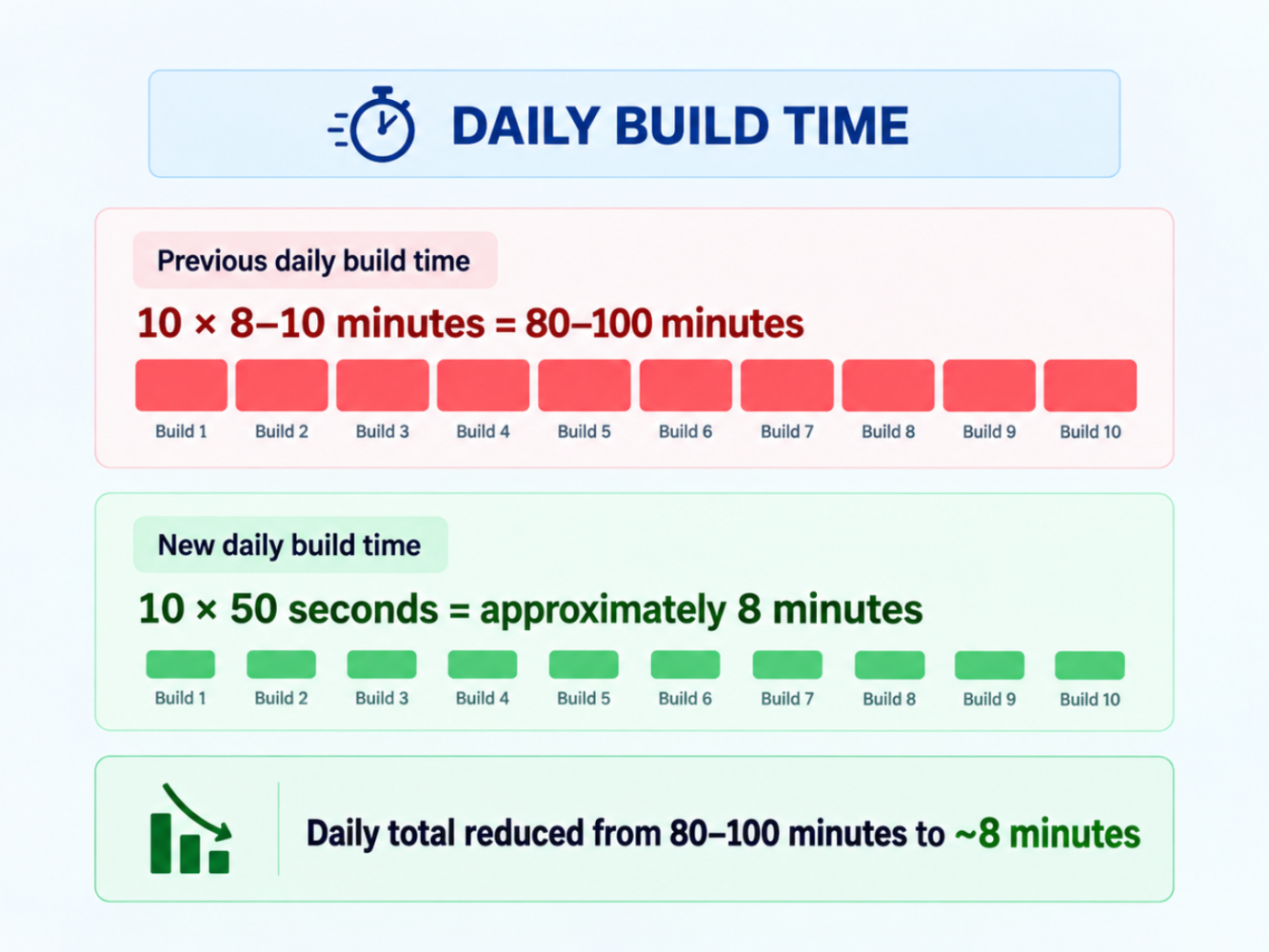
That saves between 72 and 92 minutes every day.
It also means faster CI pipelines, lower infrastructure usage, faster deployment feedback, shorter release cycles and less context switching.
Build performance is not only an infrastructure concern. It directly affects how developers work. When feedback takes ten minutes, people batch changes and postpone validation. When it takes less than one minute, verification becomes part of the normal development loop.
vDo not blindly remove Webpack configuration from a production system. First understand why it exists and verify whether Turbopack supports the relevant behavior.
The largest performance improvements do not always come from rewriting application code. Sometimes the bottleneck is the machinery processing that code.
The result was a Next.js production build reduced from 8–10 minutes to approximately 50 seconds up to 12× faster.
If your Next.js project is already on version 16 but still has --webpack in its scripts, it may be running on the old build pipeline without you realizing it.
Check your configuration. The fastest optimization may be one flag away.
#NextJS #Turbopack #WebDevelopment #SoftwareEngineering
Technical / Solutions Architect
https://www.linkedin.com/pulse/i-reduced-my-nextjs-production-build-time-12-from-10-50-melkumyan-vmnhf/