The Legendary Interview Question: What Happens When You Type a URL Into Your Browser?
- Home
- The Legendary Interview Question: What Happens When You Type a URL Into Your Browser?

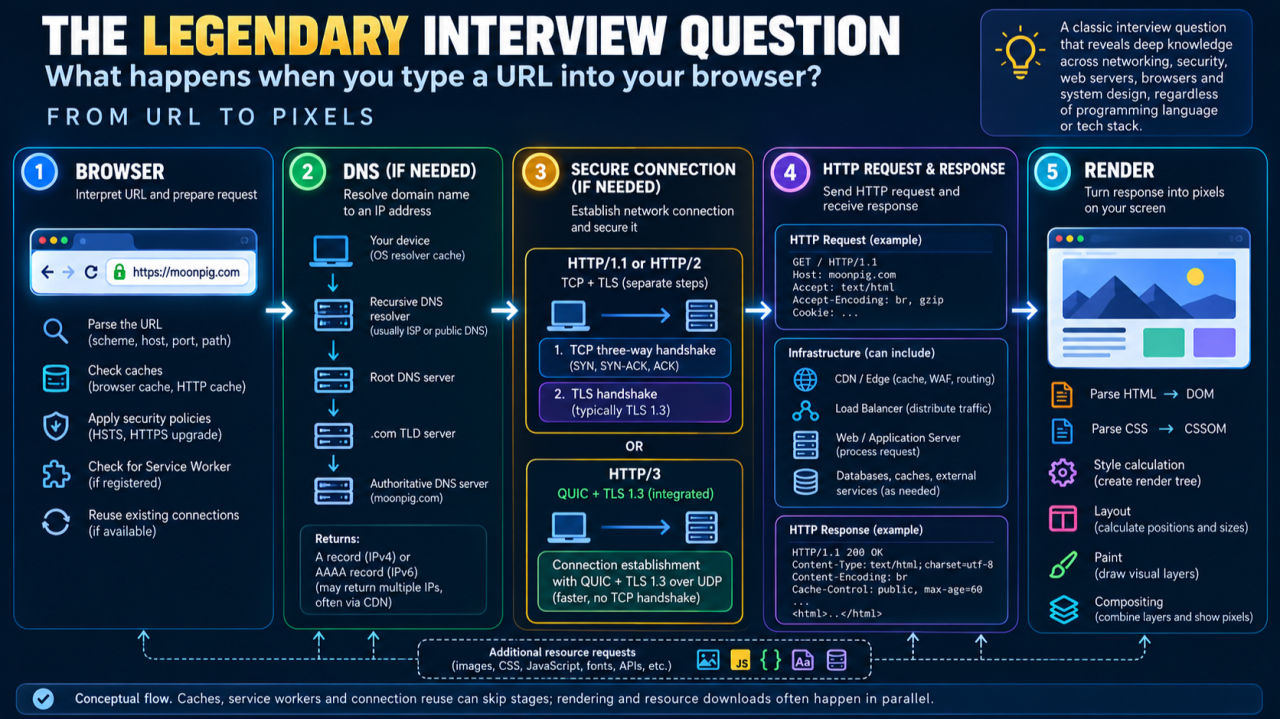
magine an interviewer asks:
"You open your browser, type example.com, and press Enter. What happens next?"
Sounds simple, doesn't it?
A beginner might answer:
"The browser resolves DNS, establishes a connection, sends an HTTP request, receives HTML, and displays the webpage."
That's a reasonable high-level answer.
But what if we explore what happens beneath the surface?
We quickly enter the world of computer networking, DNS, operating systems, TCP, QUIC, TLS, HTTP, distributed architectures, browser engines, and performance engineering.
And that's what makes this question legendary.
Let's examine the complete journey.
When you type example.com, the browser first determines whether the input represents a search query or a navigable web address.
A modern browser will generally recognize it as a hostname and typically attempt HTTPS, depending on browser settings and security policies.
If you explicitly enter https://example.com, the scheme is already specified.
The browser identifies the components of the URL, including the scheme, hostname, optional port, and path.
It may also consider:
Important engineering insight: Entering a URL does not necessarily initiate a new network request.
Depending on the navigation and available cached resources, some operations may be avoided entirely.
If the browser needs to establish a network connection, it must determine a suitable IP address for the destination.
The browser or operating system consults available DNS information and caches.
When necessary, a recursive DNS resolver performs further resolution.
For an uncached domain, this may involve the DNS hierarchy:
Root DNS → .com TLD → Authoritative DNS Server
However, the recursive resolver may already have enough cached information to avoid contacting these servers.
DNS responses can include:
Modern websites often operate behind CDNs or edge networks.
Consequently, the resolved IP address might belong to edge infrastructure rather than the actual application server.
Different users can also receive different IP addresses based on network conditions, geographic location, or DNS policies.
Advanced interview question: Does every browser navigation trigger a DNS lookup?
No. DNS caching, existing connections, and locally satisfied navigations can avoid another lookup.
Once a destination address is available, the operating system determines how to reach it.
The network stack consults routing information to select an appropriate next hop.
On a local network, this may involve ARP for IPv4 or Neighbor Discovery for IPv6.
Packets may travel through gateways, routers, and network address translation (NAT) devices before reaching their destination.
One important distinction:
DNS identifies an address. IP routing determines how packets can reach that address.
Neither operation determines which backend application will ultimately process the HTTP request.
This is where the question becomes particularly interesting.
The connection establishment process depends on the HTTP version and transport protocol.
HTTP/1.1 and HTTP/2
HTTPS normally operates over TCP.
A new TCP connection begins with the three-way handshake:
A TLS handshake then establishes secure communication.
HTTP/2 supports multiplexing multiple HTTP streams over one TCP connection.
HTTP/3
HTTP/3 is fundamentally different.
It uses QUIC over UDP rather than TCP.
QUIC integrates TLS 1.3 into connection establishment, supports multiplexed streams, and avoids TCP's transport-level head-of-line blocking across independent QUIC streams.
However, HTTP/3 is not automatically faster in every environment.
Connection reuse, network conditions, packet loss, and implementation details all influence performance.
Senior-level interview question: Why can HTTP/3 behave better than HTTP/2 on lossy networks, and under what conditions might the improvement be negligible?
For HTTPS, the browser establishes an authenticated, encrypted connection.
During TLS negotiation, the client and server establish cryptographic parameters and shared session keys.
The browser validates the server certificate, including the hostname and trust chain.
ALPN is used to negotiate an application protocol, such as HTTP/2 or HTTP/3.
HTTP/3 incorporates TLS 1.3 into QUIC, rather than using a separate TLS layer over TCP.
Modern browsers can also benefit from session resumption and existing secure connections.
Advanced interview question: What happens when TLS terminates at a CDN or load balancer?
This leads to architectural discussions about edge security, certificate management, encrypted upstream connections, and trust boundaries.
Once a suitable connection is available, the browser can send an HTTP request.
For a typical webpage navigation, this is usually a GET request.
An illustrative HTTP/1.1 request contains:
Method: GET
Path: /
Host: example.com
Accept: text/html
The actual request can contain additional information such as cookies, accepted encodings, language preferences, and caching headers.
HTTP/2 and HTTP/3 use different wire formats and framing, although their HTTP semantics remain closely related.
The browser might receive several kinds of responses:
An important distinction is that 304 Not Modified is not returned for every cache hit.
When a browser can directly reuse a fresh cached response, another network request may not be necessary.
A 304 response is relevant when the client performs cache revalidation using suitable conditional headers.
Depending on the architecture, a request might pass through:
Browser → CDN / WAF → Load Balancer / Reverse Proxy → Web Server → Application → Cache / Database / External Services
This is a conceptual production architecture, not a verified description of some specific infrastructure.
Different applications use different combinations of these components.
For example, a CDN might satisfy the entire request without contacting the origin server.
If the request reaches an application, processing might include:
The backend could be written in ASP.NET Core, Spring Boot, Node.js, Go, Python, or another technology.
The fundamental architectural questions remain largely the same.
Advanced interview question: What happens when a backend request waits for a database query or another network operation?
A strong candidate should explain concurrency, asynchronous I/O, thread management, resource utilization, and the implications for system scalability.
The server or an intermediary returns an HTTP response.
Its headers can describe:
The response body might contain HTML, JSON, images, or other resources, depending on the request.
HTTP caching can improve performance by reducing repeated network transfers.
CDN caching, browser caching, and application-level caching solve related but different problems.
An experienced engineer should understand cache freshness, validation, invalidation, personalized responses, and consistency.
Senior-level interview question: How would you prevent one authenticated user's personalized content from being served to another user through a shared cache?
This tests much more than basic HTTP knowledge.
Receiving HTML is not the same as displaying a completed webpage.
The browser must transform the received resources into visual content.
The conceptual rendering pipeline includes:
HTML Parsing → DOM Construction
CSS Parsing → CSSOM Construction
Style Calculation → Render Tree → Layout → Paint → Compositing
HTML parsing can begin before the complete document has arrived.
CSS determines styling and can delay rendering.
JavaScript can modify the DOM, request additional resources, or affect when rendering becomes possible.
Traditional synchronous scripts can block HTML parsing, while async and defer influence execution timing.
Meanwhile, browsers may download images, scripts, stylesheets, and fonts concurrently.
Modern web applications can introduce additional patterns such as Server-Side Rendering, Client-Side Rendering, and Hydration.
Importantly, the browser can render content progressively.
The user may see a webpage before all JavaScript files, images, or API requests have finished loading.
That is a crucial distinction in frontend performance engineering.
A Senior Engineer should go beyond explaining how the webpage loads.
They should understand why it may load slowly.
Potential sources of latency include:
Important performance measurements include:
TTFB (Time to First Byte) measures the interval between the beginning of navigation and arrival of the first response byte. It may include redirects, Service Worker processing, DNS, connection setup, and server processing.
It is not exclusively a measure of backend execution time.
LCP (Largest Contentful Paint) measures when the largest eligible visible content element is rendered.
INP (Interaction to Next Paint) evaluates responsiveness to user interactions.
CLS (Cumulative Layout Shift) measures unexpected visual instability.
Useful diagnostic tools include browser DevTools, network waterfalls, performance traces, real-user monitoring, server logs, and distributed tracing.
These questions help distinguish theoretical familiarity from practical engineering experience.
"What happens when you type a URL into your browser?"
A simple question.
Yet the complete answer involves networking, operating systems, security, HTTP protocols, distributed systems, cloud infrastructure, backend engineering, browser internals, and performance optimization.
And that is exactly why I consider it a legendary engineering interview question, regardless of programming language or technology stack.
Understanding how a system works is valuable. Understanding why it behaves differently under various conditions is what demonstrates engineering maturity.
#SoftwareEngineering #TechnicalInterviews #SystemDesign #WebPerformance #Networking #SoftwareArchitecture #BackendDevelopment #FrontendDevelopment
Technical / Solutions Architect
https://www.linkedin.com/pulse/legendary-interview-question-what-happens-when-you-type-melkumyan-pbygf/