.NET Performance with DirectCompute and ComputeSharp
- Home
- .NET Performance with DirectCompute and ComputeSharp

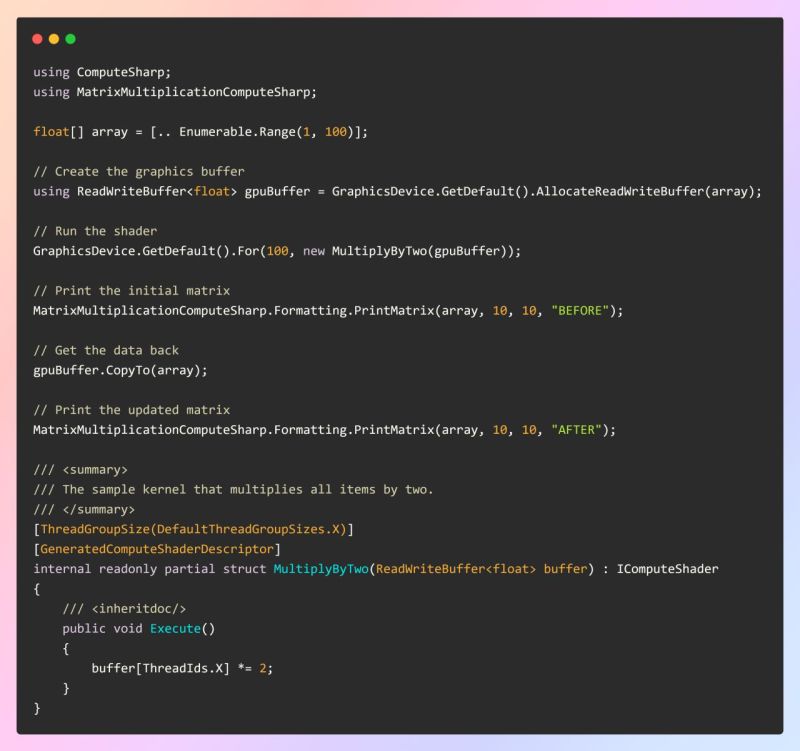
In this example, we'll walk through a simple but effective use case: multiplying every element in an array by two.
Here's how this GPU-accelerated process works:
We use the GraphicsDevice to allocate GPU buffers to hold the data that will be processed.
The shader processes each element in parallel, multiplying every array element by two using the GPU.
Once processed, the data is transferred back to the CPU for further use or display.
We print the data before and after GPU processing, demonstrating the effect of the shader.
For compute-heavy and parallelizable tasks, the GPU's architecture can provide significant speed improvements compared to traditional CPU-based methods.
Common use cases include:
Leveraging ComputeSharp makes GPU programming more accessible than ever in the .NET ecosystem.
GPU acceleration isn't just for graphics!
It's a powerful tool for computation-heavy workloads where parallel processing can make a difference.
Start small with simple array operations, then explore more complex use cases like machine learning, large-scale data processing, or scientific computing.
#GPUComputing #DirectCompute #ComputeSharp #HighPerformanceComputing #ParallelProcessing #CodeSnippets #GPUEngineering<br><br><br><br><br>
Armen Melkumyan
Technical / Solutions Architect